Lawn.Smart
A month-by-month lawn care plan tuned to your USDA hardiness zone.
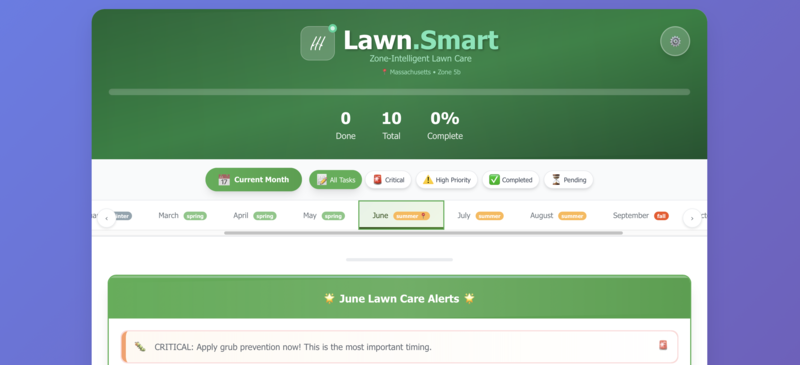
Know exactly what your lawn needs this month. Lawn.Smart builds a lawn care plan for your state and USDA hardiness zone, prioritizes the tasks that can't wait, tracks what you've done year over year, and installs on your phone like a native app.
Any modern browser · Installs to your home screen · Free
What it does for you
Tuned to your zone
Covers all 50 states and USDA hardiness zones 3a to 11b, so timing is right for where you actually live.
Priorities that matter
Tasks are ranked Critical, High, Medium or Low, and time-sensitive work like pre-emergent is surfaced first.
Calendar and history
See the whole month at a glance, then track what you completed year over year with streaks and a monthly notes journal.
Product picks
Recommendations matched to this month's tasks, so you know what to buy before you head to the store.
Built for your phone
A dedicated mobile layout puts your most important task up front, with a full three-column view on desktop.
Install it, use it offline
Add it to your home screen like a native app. It works offline and can remind you about seasonal tasks.
Quick Start
Up and running in a couple of minutes
- 1
Open Lawn.Smart
Free, with no account needed.
https://www.lawnsmartapp.com - 2
Set your location
Enter your zip code, or choose your state, and click Get Started. Your USDA zone and season are set for you.
- 3
Work this month's plan
Start with the Critical task at the top and check tasks off as you go. Use Calendar to look ahead and History to see your progress.
- 4
Add it to your home screen
On iPhone, tap Share then Add to Home Screen in Safari. On Android, tap Install app in Chrome. Settings has step-by-step guides.